


Google has officially launched a native integration between Google Business Profile (GBP) and Google Analytics 4 (GA4), letting local businesses track offline and local engagement—like calls, direction requests, and bookings—alongside website and app data in one place.
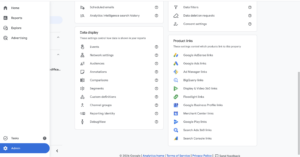
You link your verified Google Business Profile(s) to a GA4 property via Admin → Product links → Google Business Profile links.
Once linked, Analytics pulls GBP interaction data directly and displays it in a new Google Business Profile reporting collection under Reports.
No custom events or Looker Studio builds are required for the core metrics; the collection appears automatically when the link exists.
After linking, GA4 surfaces seven core GBP metrics:
Interactions – Total meaningful engagements with your profile on Search and Maps.
Phone calls – Calls initiated directly from your GBP listing.
Bookings – Appointments/reservations made via Google’s booking integrations.
Direction requests – Users asking for directions (a strong offline‑intent signal).
Website clicks – Clicks from your GBP to your site, now tied to GBP performance.
Messages – Conversations started through GBP messaging.
Menu views – For restaurants/food businesses, how often menus are viewed from the profile.
These metrics help you treat calls, directions, and bookings as “proxy conversions” for offline intent, especially for service businesses, clinics, salons, contractors, and multi‑location brands.
GA4 adds a structured GBP report set that’s visible only when a profile is linked, making it easier to:
Review local engagement trends over time.
Compare performance across locations (for franchises and multi‑site businesses).
Align local signals with on‑site behavior and conversion funnels.
This is particularly useful for agencies, SEOs, and brands that previously stitched together spreadsheets, GBP exports, and Looker Studio dashboards.
GBP data in GA4 currently uses a rolling 6‑month window.
If you select a date range older than six months, Analytics will show the most recent available GBP data instead of true historical values. If you need long‑term trend analysis, export or archive reports regularly.
Virtually any business that relies on local discovery via Google Search and Maps should connect GBP to GA4, including:
Home services (HVAC, roofing, plumbing)
Healthcare and wellness (dentists, clinics, salons, fitness)
Hospitality and food (restaurants, hotels)
Professional services (law, accounting, real estate)
Retail and automotive
Agencies managing multiple client profiles or franchise locations
The payoff is clearer attribution: you can see which locations drive the most calls, direction requests, bookings, and site clicks—and tie those to broader marketing efforts.
Follow these steps inside your GA4 property
Open Google Analytics 4 and go to Admin (gear icon).
Under Product links, select Google Business Profile links.
Click Link → Choose Google Business Profiles.
Select the GBP account(s)/location(s) you manage and confirm.
Review and Submit to complete the linking.
Permissions you’ll need: Editor/Admin on the GA4 property and Owner/Manager on the GBP listing(s)
Once connected, the GBP reports appear automatically in the left navigation under Reports.
Unified measurement: Local actions (calls, directions, bookings) now live next to site/app metrics, reducing reporting fragmentation.
Better offline‑intent signals: Direction requests and calls are high‑intent behaviors that often precede store visits or purchases.
Simpler, more accurate reporting: Fewer manual exports, fewer UTM workarounds, and less reliance on third‑party tools for core local KPIs.
Multi‑location clarity: Easier to benchmark locations and allocate budget based on real local engagement, not just traffic.
Set up now and baseline: Link all relevant locations and capture a clean baseline before scaling campaigns.
Export monthly: Because of the 6‑month limit, schedule regular exports if you need multi‑year comparisons.
Combine with GA4 conversions: Use GBP metrics as top/mid‑funnel signals and pair them with on‑site conversions to model full‑funnel impact.
Location‑level analysis: For franchises, compare calls/directions/bookings per location to identify underperforming stores or high‑potential markets.
This native GBP → GA4 integration is one of the most impactful local marketing updates of 2026 because it finally closes the measurement gap between Search/Maps activity and website analytics.
If your growth depends on local visibility, connecting your Google Business Profile to Google Analytics should be a priority: it simplifies reporting, sharpens insight into customer behavior, and makes it easier to prove how your Google presence drives real‑world results.
Want to Make the Most of Google Analytics & Google Business Profile? Our Autus Digital Agency, SEO Company in India can help you set up GA4, integrate your Google Business Profile, improve Local SEO, and build accurate reporting that turns data into business growth.

Gaurav Madan, Founder and CEO of Autus Digital Agency, is a pioneering figure in digital marketing with experience of 20+ years. His expertise revolutionizes online marketing strategies and leverages digital platforms for business growth. Gaurav’s consumer-centric approach and strategic vision propel diverse industries to position online presence and dominate.


The way the world searches on Google just changed — and not just a little. At Google I/O 2026, the company unveiled what it’s calling the biggest upgrade to the Google Search box in over 25 years, marking a major shift in how users interact with the world’s most popular search engine. For two and […]
.....
People who use the internet don’t usually think about how it works. Every website, online store, blog, and business platform needs servers, hosting panels, databases, and management software to all work together in the background. If one of these systems stops working or gets weak, it can hurt millions of websites in just a few […]
.....
Google has once again shaken the SEO world with its March 2026 Spam Update, and if you’ve noticed sudden ranking fluctuations, traffic drops, or unexpected gains—this update could be the reason behind it. Over the past few years, Google has been aggressively refining its algorithms to eliminate low-quality content and reward websites that genuinely help […]
.....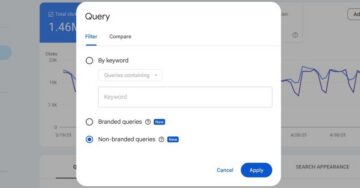
Google has rolled out its branded queries filter in Search Console to all eligible sites, simplifying how SEOs analyze branded versus non-branded traffic. This native tool replaces manual regex hacks, making performance reporting more efficient for eCommerce and health sites. Key Takeaways Universal Access: As of March 10, 2026, the AI-powered filter is now live […]
.....
Google is constantly tweaking its search interface, and the latest experiment spotted in the wild could signal a shift in how users access its advanced AI features. According to a recent report, Google is testing a new blue “Send” button that appears in the search box as you start typing—replacing the prominent AI Mode button. […]
.....
Google released its December 2025 core update on December 11, 2025, and created a buzz in the SEO world. Google released its third big core update this year after March and June. The search landscape could change again. These core updates are surely wide changes to Google’s ranking systems, and effects may take time to […]
.....
Google Search Console’s latest experimental feature is really next-level for marketers, and it has been constantly improving. Now, you can monitor your social media channels in Google Search Console, directly alongside your website. Google has posted this update from its official social media account. It’s a great time-saver and a powerful method for shaping content […]
.....
Google is testing a new mobile search flow in which you can directly switch from AI overview to AI mode without leaving the result page. The information of this test is shared by Robby Stein, who is currently serving as Google’s Vice President of Product for Search. He shared this information on X. Meanwhile, Google […]
.....
SEO has never been static. Even a few years ago, you could get by with basic keyword research and a few backlinks. Now, search engines are smarter, users are savvier, and AI is starting to play a role in determining what content surfaces. For marketers and website owners, keeping up can feel overwhelming. Recently, Semrush […]
.....
If you follow Google’s SEO and structured data updates, 2025 started with big news that surprised even seasoned marketers. Google officially announced the retirement of six types of structured data that have been part of the search ecosystem for years. For webmasters, this is more than a technical change. It signals a shift in how […]
.....
Generative AI (Gen AI) has moved from buzzword to business reality. It is reshaping workflows, strategies, and even results across industries, but in no place is its impact felt more pronounced than in advertising. What was once experimental technology is now being utilized by millions of advertisers across the world, enabling them to design campaigns […]
.....


