


Visual overview of Google Lighthouse’s new Agentic Browsing Audit.
Google Lighthouse has long been one of the most trusted tools for developers, SEO professionals, and website owners because it evaluates website performance, accessibility, SEO, and overall quality. In 2026, Google introduced a new Lighthouse category called Agentic Browsing, reflecting the growing role of artificial intelligence in web interactions. Unlike traditional search crawlers that mainly read content and follow links, AI agents actively interact with websites by clicking buttons, filling forms, navigating pages, and completing user tasks. This new audit helps determine whether your website is prepared for this next generation of intelligent browsing, making it an important consideration for future-ready technical SEO.
Google Lighthouse’s Agentic Browsing Audit is a new testing category designed to measure whether AI-powered agents can successfully understand and interact with your website. Traditional search engine bots primarily crawl webpages to index information, while AI agents perform actions similar to human visitors. They may complete purchases, submit forms, navigate dashboards, or search for specific information. This audit evaluates whether your website provides the semantic structure, stable layouts, and interactive clarity required for these intelligent systems. As AI assistants become more capable, websites optimized for agentic browsing will likely deliver better experiences for both users and automated systems.
Google introduced the Agentic Browsing Audit because the internet is changing beyond traditional search. AI assistants are becoming capable of performing tasks that previously required human interaction. Modern AI can compare products, complete online bookings, submit applications, manage accounts, and navigate websites automatically. These advanced capabilities require websites to provide clear structure and predictable interactions. If an AI agent cannot correctly identify buttons, understand forms, or navigate a page, important tasks may fail. This new Lighthouse category encourages developers to build websites that are reliable for both people and intelligent systems, supporting the future of AI-assisted browsing.
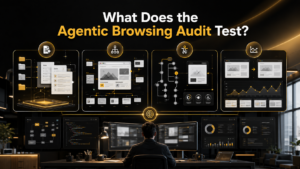
The core technical areas evaluated by the Agentic Browsing Audit.
The Agentic Browsing Audit currently evaluates four important areas that influence how AI agents understand and interact with websites. These checks are divided into emerging AI standards and established web quality standards. The emerging standards include llms.txt and WebMCP, which are still evolving and are not yet widely implemented. The established standards include the Accessibility Tree and Cumulative Layout Shift (CLS), both of which already contribute to better usability and performance. Together, these four checks help developers identify issues that may prevent AI systems from completing tasks on their websites.
The llms.txt audit checks whether your website provides a structured summary that AI language models can easily understand. Similar in concept to robots.txt, this proposed file is placed at the root of your domain and uses Markdown formatting to describe your website’s content, navigation, and important resources. Rather than forcing AI models to crawl thousands of pages, the file offers a simplified overview that improves understanding. Although Google does not currently require llms.txt for search, it represents an emerging AI standard that developers should monitor as the industry continues evolving toward AI-first web experiences.
Is llms.txt Important Right Now?
For most websites, llms.txt is not yet essential. Google has clearly stated that this file is not required for Google Search, and there is currently no confirmed SEO ranking benefit associated with implementing it. However, websites containing extensive documentation, developer resources, or technical knowledge bases may eventually benefit from providing AI models with organized summaries. Because industry adoption remains limited, businesses should understand the concept without prioritizing implementation over more impactful improvements. Keeping track of future developments will allow website owners to adopt the standard when stronger evidence and broader support become available.
WebMCP, short for Web Model Context Protocol, is another experimental technology included in the Agentic Browsing Audit. Its purpose is to help AI agents understand the exact function of interactive website elements. Instead of forcing an AI model to guess what a button or form accomplishes, WebMCP provides machine-readable descriptions that clearly define each action. For example, it can specify whether a button submits payment, creates an account, or schedules an appointment. This additional context helps AI systems perform tasks more accurately while reducing the possibility of incorrect interactions on complex websites.
Should You Implement WebMCP Today?
Although WebMCP represents an exciting advancement, it is still under active development and should not be considered an immediate priority. Most websites currently fail this audit because the protocol has not reached widespread adoption. Google includes the check primarily to encourage awareness rather than demand implementation. Since the specification may continue changing, early implementations could require future revisions. Website owners should monitor updates from Google and browser developers while focusing their current efforts on accessibility improvements and performance optimization, which provide immediate benefits for users and AI agents alike.
The Accessibility Tree is currently the most valuable part of the Agentic Browsing Audit because it directly affects how AI agents understand your website. This semantic structure is already used by screen readers and assistive technologies to interpret webpages for users with disabilities. Google now considers it equally important for AI-powered browsing. Elements such as headings, buttons, forms, navigation menus, roles, names, and relationships are all represented within the Accessibility Tree. When these elements are properly structured, AI systems can confidently navigate pages and complete tasks without misunderstanding the website’s intended functionality.
Common Accessibility Issues
Many websites contain accessibility problems that reduce usability for both people and AI systems. Common issues include missing ARIA labels, unlabeled form fields, buttons without accessible names, incorrect heading hierarchy, poor keyboard navigation, broken focus management, and improper semantic HTML usage. These mistakes make it difficult for screen readers and AI agents to interpret page content correctly. Fixing accessibility problems improves compliance with accessibility standards while also creating clearer navigation, stronger semantic structure, and better interaction for every visitor. Investing in accessibility provides long-term value beyond simply passing Lighthouse audits.
Benefits of a Strong Accessibility Tree
A well-built Accessibility Tree delivers advantages that extend far beyond AI compatibility. It improves usability for visitors with disabilities, strengthens semantic HTML structure, enhances navigation, and supports compliance with accessibility standards such as WCAG. Search engines also benefit from cleaner page organization and descriptive content relationships. As AI assistants increasingly rely on semantic information rather than visual layouts, accessible websites become easier for intelligent systems to interpret accurately. This makes accessibility one of the highest-return technical improvements website owners can invest in while preparing for the future of AI-powered web interactions.
Cumulative Layout Shift, commonly known as CLS, measures how much webpage content unexpectedly moves while a page is loading. It has already been an important Core Web Vital because layout instability creates a frustrating experience for users. Google now recognizes that the same issue also affects AI agents performing automated tasks. If a button shifts position after an AI attempts to click it, the system may accidentally trigger the wrong action. Stable layouts are therefore essential for successful purchases, registrations, bookings, and other interactive processes that AI assistants may increasingly perform on behalf of users.
Common Causes of Poor CLS
Poor CLS scores usually result from design and loading issues that cause webpage elements to move unexpectedly. Images without predefined dimensions, late-loading web fonts, dynamic advertisements, embedded videos, third-party widgets, and content inserted above existing sections frequently create layout instability. These problems confuse visitors and increase the likelihood of interaction errors for AI agents. Fortunately, many CLS issues can be resolved by reserving space for media, optimizing resource loading, reducing unnecessary scripts, and improving page rendering strategies. Addressing these factors enhances both user experience and AI compatibility.
Running the Agentic Browsing Audit is simple for developers using modern versions of Google Chrome. Lighthouse version 13.3, available in Chrome 150 and later, includes this category by default. Users running Chrome versions 130 through 149 must first enable the WebMCP testing flag before accessing the feature. Once enabled, open Chrome DevTools, select the Lighthouse panel, choose the Agentic Browsing category, and analyze the page. Begin testing pages with heavy user interaction, including checkout flows, login pages, booking systems, dashboards, and registration forms, because these areas benefit most from AI compatibility improvements.
Preparing your website for agentic browsing does not require rebuilding everything from scratch. Instead, focus on improving the technical foundation that already supports good SEO, accessibility, and user experience. Begin by using semantic HTML elements correctly, adding descriptive ARIA labels, labeling every form field, and maintaining a logical heading hierarchy. Improve page stability by reserving space for images, advertisements, and embedded media before they load. Regularly test important pages with Google Lighthouse after updates, and monitor emerging standards such as llms.txt and WebMCP. These gradual improvements will make your website easier for both AI agents and human visitors to navigate.
Optimizing your website for agentic browsing delivers benefits that extend beyond AI compatibility. A well-structured website becomes easier for users to navigate, improves accessibility for people using assistive technologies, and supports better technical SEO. Stable layouts reduce interaction errors, while semantic HTML helps search engines and AI systems understand your content more accurately. These improvements can also increase user satisfaction, reduce bounce rates, and improve overall website quality. As AI-powered assistants continue evolving, websites that already follow these best practices will require fewer changes and remain better prepared for future digital experiences.
The data provided by the Agentic Browsing Audit helps developers identify weaknesses that traditional SEO or performance reports may overlook. Instead of focusing only on speed or search visibility, the audit reveals whether AI systems can actually complete important user tasks. This information helps prioritize technical improvements that affect accessibility, usability, and interaction quality. By reviewing audit results regularly, businesses can detect issues before they impact visitors or automated systems. These insights support smarter development decisions, improve long-term website maintenance, and ensure your site remains compatible with emerging AI-powered browsing technologies.
Not every part of the Agentic Browsing Audit deserves the same level of attention today. The highest priority should be improving your Accessibility Tree and Cumulative Layout Shift (CLS) because both directly affect usability, accessibility, and website performance. These improvements also provide immediate benefits for human visitors, search engines, and AI agents. The llms.txt file is worth understanding, especially for documentation-heavy websites, but it does not currently provide confirmed SEO advantages. WebMCP should simply be monitored until the protocol becomes more stable and gains wider industry adoption before significant implementation efforts begin.
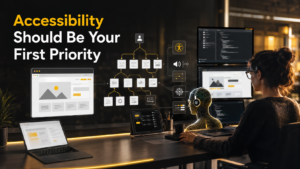
Accessibility improvements help both users and AI systems understand websites.
Accessibility improvements offer the greatest long-term return because they help every type of visitor interact with your website successfully. Use semantic HTML wherever possible, provide meaningful labels for buttons and forms, maintain proper heading structure, and ensure keyboard navigation works correctly. Descriptive link text and logical page organization make content easier for screen readers and AI systems to understand. These enhancements also strengthen your site’s semantic foundation, improving clarity for search engines. By prioritizing accessibility today, you create a website that is more inclusive, future-ready, and better equipped for AI-assisted browsing experiences.

Stable webpage layouts improve both user experience and AI task completion.
Layout stability plays a significant role in ensuring AI agents can complete actions without mistakes. Reserve fixed dimensions for images and videos before they load, optimize font loading to prevent text shifts, and avoid inserting advertisements or dynamic content above existing page elements. Review pages that rely heavily on JavaScript or third-party widgets because these often introduce unexpected movement. Regularly testing your pages with Lighthouse helps identify layout problems before they affect users. Stable pages not only improve Core Web Vitals but also reduce the likelihood of AI agents performing incorrect actions.
Although llms.txt and WebMCP are still evolving, they represent the direction AI-friendly websites are heading. Businesses should stay informed about updates from Google, browser vendors, and the developer community rather than rushing into implementation. As industry support increases, these standards may become valuable for improving AI understanding and interaction. Following reputable web development resources and periodically reviewing Lighthouse updates ensures you remain prepared for future changes. Monitoring emerging technologies allows your website to adapt gradually instead of requiring major redesigns once these standards become widely accepted.
The introduction of the Agentic Browsing Audit demonstrates that websites are no longer designed solely for human visitors or traditional search crawlers. AI assistants are becoming capable of browsing websites, completing purchases, scheduling appointments, and managing online accounts independently. To support these capabilities, websites must provide clear semantic structure, predictable interactions, accessible navigation, and stable layouts. Businesses that invest in these technical improvements today will be better positioned as AI-assisted browsing becomes increasingly common. Building for accessibility and usability now creates a stronger foundation for tomorrow’s intelligent web experiences.
Google Lighthouse’s Agentic Browsing Audit represents an important step toward the future of technical SEO and web development. Rather than evaluating only speed or search optimization, it measures whether AI-powered systems can successfully understand and interact with your website. While llms.txt and WebMCP remain developing standards, improving your Accessibility Tree and Cumulative Layout Shift should be your immediate priorities. These enhancements create better experiences for users, assistive technologies, search engines, and AI agents alike. Websites built with accessibility, semantic structure, and stable performance will be well prepared for the next generation of intelligent browsing.
It is a website audit, that checks how well AI agents, can understand, navigate, and complete important tasks on a website.
It helps websites prepare, for AI-powered browsing, while improving usability, accessibility, and overall website quality.
No. It works alongside, existing Lighthouse reports, and focuses specifically, on AI-driven browsing experiences.
Website owners, developers, SEO professionals, digital marketers, and businesses, that want future-ready websites, should use this audit.
Although there is no direct ranking factor, improving website structure, accessibility, and usability, often supports better SEO performance, and improved user experience.

Gaurav is working on various verticals like IT & Software Solutions | Digital Marketing | E-Commerce | BPO | Outsourcing | Offshoring | Global Deliveries | Exports | Education. Gaurav believes in CHANGE, which is constant throughout the LIFE so be with the CHANGE Gaurav is having, In-depth experience in IT Solutions, Offshoring, Internet Branding, Sales & Marketing, Managing New Projects & Processes, Solution Designing and Transitioning of New International and Domestic business engagements. Proficient at managing & leading teams to run successful operations & experienced in developing procedures, service standards, client satisfaction using standard frameworks for business excellence.

SEO is one of the most effective long-term digital marketing strategies, but it rarely delivers overnight success. Many website owners become frustrated because they expect immediate improvements after publishing optimized content or fixing technical issues. In reality, successful SEO is measured through gradual improvements across multiple performance indicators rather than a single metric. So, how […]
.....
Duplicate content is one of the most common technical SEO problems affecting websites of all sizes. It occurs when identical or highly similar content appears on multiple URLs, making it difficult for search engines to determine which version should rank in search results. While Google generally doesn’t apply a direct penalty for duplicate content, it […]
.....
A sudden decline in Google traffic can be one of the most stressful situations for any website owner. A website that previously generated consistent visitors, leads, and revenue may suddenly experience fewer clicks, lower rankings, and declining visibility in search results. However, a traffic drop does not always mean a website is permanently damaged. With […]
.....
Artificial intelligence has fundamentally changed how people discover information online. Instead of clicking through multiple search results, users increasingly rely on AI-powered assistants like ChatGPT, Google AI Overviews, Gemini, Claude, Microsoft Copilot, and Perplexity to summarize answers instantly. This shift has introduced a new phenomenon known as Ghost Citations. Your research, statistics, definitions, or insights […]
.....
Creating a successful B2B SaaS marketing strategy has become more challenging than ever. With increasing competition, longer buying cycles, AI-powered search experiences, and evolving customer expectations, SaaS companies need far more than a great product to achieve sustainable growth. A modern strategy combines SEO, content marketing, product-led growth, demand generation, paid advertising, marketing automation, customer […]
.....
The pharmaceutical industry has become increasingly digital, with healthcare professionals, patients, and researchers relying on search engines to discover medications, treatment options, clinical research, and healthcare providers. As competition intensifies, pharmaceutical companies need specialized SEO strategies that not only improve search visibility but also comply with strict healthcare regulations. Unlike general SEO agencies, top pharmaceutical […]
.....
If your auto repair shop isn’t showing up when potential customers search for terms like “brake repair near me” or “oil change in my city,” you’re likely missing valuable business every day. Most vehicle owners turn to Google before choosing a mechanic, making your online visibility just as important as the quality of your services. […]
.....
Finding trending topics is one of the most effective ways to create content that attracts readers, ranks higher in search engines, and gains visibility across AI-powered platforms. Whether you’re a blogger, SEO professional, marketer, or business owner, understanding what people are searching for helps you publish content at the right time and stay ahead of […]
.....
Businesses have spent years optimizing websites for Google Search, but AI-powered search experiences are changing how people discover brands. Millions of users now ask ChatGPT, Microsoft Copilot, Gemini, Claude, and Perplexity for recommendations instead of browsing search results. These AI assistants summarize information from trusted sources, making it essential to understand whether your business is […]
.....
Search has entered a new era. Instead of presenting users with a list of web pages, AI-powered search engines now provide direct, conversational answers. Platforms such as Google AI Overviews, ChatGPT, Gemini, Microsoft Copilot, Claude, and Perplexity are changing how people discover information online. As a result, businesses can no longer rely solely on traditional […]
.....
Search behavior has changed dramatically over the last few years. Instead of relying only on traditional search engines, users now seek authentic discussions, real-world experiences, and community-driven recommendations before making decisions. This shift has transformed Reddit from a discussion platform into one of the most influential sources for search visibility. Today, Google frequently ranks Reddit […]
.....
Many advertisers celebrate when their PPC dashboard shows thousands of clicks. Unfortunately, clicks alone don’t generate revenue. If your PPC Campaign Generates Clicks but produces few or no leads, you’re paying for traffic that isn’t converting. This situation is more common than many businesses realize. A campaign may have an excellent Click-Through Rate (CTR), low […]
.....
Search engines have transformed dramatically over the past two decades. Early search engines relied heavily on matching keywords, backlinks, and page authority to determine rankings. Today, artificial intelligence is redefining how information is discovered, interpreted, and delivered. Instead of simply displaying a list of blue links, modern AI-powered search engines analyze user intent, understand context, […]
.....
How to Sell on Amazon: The Complete Guide (2026) Selling on Amazon is among the top approaches known today to start up an online business. Amazon has millions of buyers visiting every single day looking for products in all kinds; you can sell anything on Amazon. This provides new sellers a wonderful opportunity to continue […]
.....
Google Search Console — never a better SEO tool for website owners and marketers. It enables better insights into how your website is performing, tracks clicks and impressions on search engines for relevant queries, and offers valuable indexing information. In addition to Search Ads 360, Google has now rolled out reporting for social and video […]
.....
Why You Need to Spot Fake Online Reviews The buy-before-buying: where to eat, which service to choose — people make all choices based on online tips. Before spending their money, most people read reviews. Good reviews instil trust in the mind; bad reviews force users not to buy. But not every review is real. Whatever […]
.....
Google reviews are one of the most important parts of local SEO. They help businesses build trust, improve local rankings, and attract new customers. Recently, many business owners noticed that some Google reviews suddenly disappeared. This created confusion and concern, especially for local businesses that depend on customer feedback. In most cases, Google is not […]
.....
The impact of your online reputation and perception on you/your business cannot be understated. Unwanted search results on Google can affect the trust of an individual, a professional body or company and can even lose business opportunities. Whether its news post or bad review, even an irrelevant page, removal or suppression of harmful search results […]
.....
In 2026, your online reputation is one of the most important digital assets. If you have a company, working freelance, creating the startup you will want to build a personal brand and earlier than that people will be searching online before making decisions. They read reviews, look at your website, visit social networks and consider […]
.....
Selling products online has become one of the best ways to build a business. Among all eCommerce platforms, Amazon stands out because millions of customers visit it every day. Whether you want to sell handmade items, private-label products, or branded goods, opening an Amazon store can help you reach a massive audience. The good news […]
.....


