



Visual overview of identifying and fixing duplicate content issues using technical SEO best practices.
Duplicate content is one of the most common technical SEO problems affecting websites of all sizes. It occurs when identical or highly similar content appears on multiple URLs, making it difficult for search engines to determine which version should rank in search results. While Google generally doesn’t apply a direct penalty for duplicate content, it can dilute ranking signals, waste crawl budget, split backlinks, and reduce organic visibility.
Whether duplicate pages are created by URL parameters, HTTP and HTTPS versions, pagination, printer-friendly pages, or copied content, resolving them is essential for maintaining a healthy website. This guide explains how duplicate content occurs, why it impacts SEO, and the proven techniques used by SEO professionals to fix and prevent it. By following these best practices, you can improve indexing, strengthen authority signals, and help search engines understand which pages deserve to rank.
Duplicate content refers to blocks of content that are identical or substantially similar across two or more URLs. These duplicates may exist within the same website or across different websites, making it harder for search engines to identify the preferred version to index and rank.
Duplicate content doesn’t always result from intentional copying. In many cases, it is created by website configurations, CMS settings, tracking parameters, session IDs, category archives, printer-friendly pages, or multiple URL versions serving the same content. For example, a product page might be accessible through different categories, each generating a unique URL while displaying identical information.
Search engines like Google attempt to determine the canonical version automatically, but relying solely on algorithms is risky. If Google selects the wrong version, the page you want to rank may not appear in search results.
Internal duplicate content is especially common on eCommerce and WordPress websites. External duplication often occurs when content is syndicated or copied without proper canonicalization. Identifying these issues early ensures search engines understand which version should receive ranking authority, improving both crawl efficiency and overall SEO performance.
Duplicate content weakens SEO by splitting ranking signals between multiple pages, confusing search engines, reducing crawl efficiency, and limiting the visibility of your preferred URL in search results.
Although Google has repeatedly clarified that duplicate content usually isn’t a manual penalty, it still creates several technical SEO challenges. When multiple URLs contain nearly identical information, search engines must decide which version deserves to appear in search results. This decision isn’t always aligned with your business goals.
For instance, backlinks pointing to different duplicate URLs divide authority that could otherwise strengthen a single page. Crawl bots also spend valuable resources visiting unnecessary duplicates instead of discovering new or updated content.
Duplicate content can also reduce the effectiveness of internal linking. Instead of reinforcing one authoritative page, internal links may unintentionally distribute equity across several versions. This fragmentation weakens topical relevance and may reduce keyword rankings. Resolving duplicate content helps consolidate authority, improve crawl efficiency, and increase the likelihood of the correct page appearing in search results.
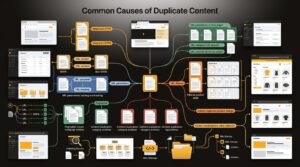
Technical sources that commonly create duplicate content across websites.
Duplicate content is often caused by technical website configurations rather than intentional copying. Understanding these causes helps you implement the appropriate SEO solution before rankings are affected.
Many duplicate content issues originate from URL variations. For example, if both HTTP and HTTPS versions remain accessible, search engines may index both copies. Similarly, websites that don’t redirect between WWW and non-WWW domains often create duplicate versions of every page.
URL parameters generated by filters, sorting options, tracking codes, or search functionality are another common cause. Large eCommerce websites frequently create thousands of parameter-based URLs that display identical products.
Content management systems may also generate archive pages, category pages, tag pages, author pages, and attachment pages containing nearly identical information. Without proper indexing rules or canonical tags, these pages compete against each other.
Content syndication introduces another challenge. Republishing articles across multiple websites without indicating the original source can dilute visibility. Proper canonical implementation ensures search engines understand which version should receive ranking signals.
Understanding the root cause is the first step toward choosing the right solution, whether that involves redirects, canonical tags, robots directives, or URL restructuring.

Identifying duplicate pages through SEO auditing and technical analysis.
Finding duplicate content requires a combination of SEO auditing tools, search engine reports, and manual inspections. Regular audits help detect duplicate URLs before they negatively affect rankings and indexing.
A comprehensive duplicate content audit should begin with your website’s crawl data. SEO crawlers can identify duplicate page titles, meta descriptions, headings, and identical body content. Reviewing these reports helps uncover pages competing for the same keywords.
Google Search Console provides valuable indexing insights by highlighting duplicate pages and reporting situations where Google selected a different canonical page than expected. Reviewing indexing reports regularly helps identify technical problems before they impact rankings.
You should also inspect URL structures manually. Look for pages accessible through multiple paths, unnecessary query parameters, staging environments accidentally indexed, or archived content that duplicates existing pages.
Pay close attention to product pages, blog categories, author archives, and tag pages, as these are common duplication sources. Regular technical SEO audits ensure new duplicate pages are identified quickly, allowing corrective actions before search performance declines.
| Issue | Recommended Solution | Best Use Case |
|---|---|---|
| HTTP vs HTTPS | Implement a 301 Permanent Redirect to the secure HTTPS version. | Website migrations and SSL implementation. |
| WWW vs Non-WWW | Use a Permanent (301) Redirect to your preferred domain version. | Maintaining consistent domain structure. |
| Duplicate Product URLs | Add a Canonical Tag pointing to the primary product page. | eCommerce websites with multiple product URL variations. |
| URL Parameters | Use Canonical Tags along with proper parameter management. | Filtered, sorted, or faceted navigation pages. |
| Deleted Duplicate Pages | Redirect old URLs using a 301 Redirect to the most relevant page. | Permanent page removals or website restructuring. |
| Printer-Friendly Pages | Apply a Canonical Tag to the original page. | Pages displaying the same content in print format. |
| Syndicated Articles | Use a Cross-Domain Canonical Tag to identify the original source. | Content syndication and publishing partnerships. |
| Duplicate PDFs | Use a Canonical Tag or Noindex directive where appropriate. | Documentation, manuals, and downloadable resource websites. |
The most effective way to prevent duplicate content is to establish clear URL structures, use canonical tags correctly, redirect unnecessary page versions, and maintain consistent internal linking across your website.
Preventing duplicate content begins with a well-planned website architecture. Every important page should have a single, preferred URL that is consistently used throughout your navigation, XML sitemap, and internal linking strategy. Avoid linking to alternate URL versions, parameter-based pages, or outdated addresses.
Canonical tags should be implemented wherever similar content must remain accessible, such as filtered product pages or printable versions. For permanently replaced pages, use 301 redirects instead of leaving duplicate versions available.
Create original page titles, meta descriptions, headings, and body content wherever possible. Even if products are similar, unique descriptions improve both user experience and search visibility.
Regular SEO audits help identify newly created duplicate pages resulting from CMS updates, plugin changes, or website redesigns. Proactive monitoring prevents duplicate content from becoming a larger indexing problem over time.
The most effective way to fix duplicate content issue is to identify duplicate URLs, choose a preferred (canonical) version, consolidate similar pages, implement 301 redirects where appropriate, and ensure search engines only index the correct page.
Fixing duplicate content requires matching the solution to the cause. Start by crawling your website and reviewing indexing reports to locate duplicate pages. If two pages serve the same purpose, merge their content into one comprehensive resource and redirect the outdated page using a 301 redirect.
When duplicate pages must remain available—for example, product pages with filter parameters or printable versions—implement a rel=”canonical” tag pointing to the preferred URL. This tells search engines where ranking signals should be consolidated.
After applying redirects or canonical tags, update internal links, XML sitemaps, and navigation so they reference only the preferred URLs. Finally, monitor Google Search Console for indexing changes and canonical reports to verify that search engines recognize the correct version.

Understanding when to use canonical tags versus permanent redirects.
Use canonical tags when multiple versions of a page must remain accessible. Use 301 redirects when duplicate pages are permanently replaced and users should always visit the preferred page.
A canonical tag is a recommendation to search engines indicating which page should be treated as the primary version. Visitors can still access duplicate pages, making canonicals useful for filtered product listings, printer-friendly pages, or syndicated content.
A 301 redirect, on the other hand, permanently forwards both users and crawlers to a new URL. It transfers most ranking signals and prevents duplicate pages from being indexed. Redirects are the preferred solution when old pages are obsolete.
A common mistake is using a canonical tag while simultaneously redirecting to another page. Choose the method that aligns with the page’s purpose. Permanent changes call for redirects, while necessary duplicate versions should rely on canonicalization.
Use descriptive anchor text that naturally supports your SEO strategy.
| Suggested Internal Page | Recommended Anchor Text |
|---|---|
| Technical SEO Guide | Technical SEO Checklist |
| SEO Audit Services | Complete SEO Audit |
| Canonical Tag Guide | Canonical Tag Implementation |
| XML Sitemap Guide | XML Sitemap Optimization |
| Google Search Console Guide | Google Search Console Tutorial |
| Website Migration Guide | Website Migration SEO |
| On-Page SEO Guide | On-Page SEO Best Practices |
| Crawl Budget Guide | Crawl Budget Optimization |
Duplicate content is a technical SEO issue that should be addressed proactively rather than ignored. While Google generally selects a preferred version automatically, relying on that process can lead to inconsistent rankings, inefficient crawling, and lost authority.
The best long-term approach is to create a clean website architecture with one preferred URL for every important page. Combine canonical tags, 301 redirects, consistent internal linking, and regular SEO audits to eliminate unnecessary duplication. Monitoring your website through Google Search Console and maintaining accurate XML sitemaps will help search engines understand your content more effectively.
By following these best practices, you’ll improve indexation, consolidate ranking signals, and build a stronger foundation for sustainable organic growth.
Not usually. Google has stated that duplicate content rarely results in a manual penalty. However, it can reduce SEO performance by splitting ranking signals, confusing indexing, and lowering crawl efficiency. The better approach is to consolidate duplicate pages and clearly identify the preferred version using redirects or canonical tags.
The fastest method depends on the cause. If duplicate pages are no longer needed, use a 301 redirect. If they must remain available, implement canonical tags. Also update internal links, XML sitemaps, and monitor Google Search Console to ensure the preferred page is indexed.
Neither is universally better. Canonical tags are best when multiple versions of a page must exist. Redirects are preferable when duplicate pages are permanently removed. Choosing the right solution depends on your website structure and content strategy.
Use SEO crawling tools, review Google Search Console indexing reports, inspect canonical tags, analyze duplicate titles and meta descriptions, and check for parameter-based URLs, archived pages, and duplicate product listings.
Yes. Using the same product descriptions across many pages makes it difficult for search engines to determine which page is most relevant. Writing unique descriptions and using canonical tags where necessary improves visibility.
Only if they no longer provide value. If you remove a duplicate page, redirect it to the most relevant replacement. Deleting pages without redirects may lead to broken links and lost ranking signals.
Common causes include HTTP and HTTPS versions, WWW and non-WWW domains, URL parameters, category archives, tag pages, printer-friendly pages, and CMS-generated duplicates.
A monthly technical SEO audit is recommended for most websites. Large eCommerce or frequently updated websites may benefit from weekly monitoring to detect duplicate pages before they affect indexing and rankings.

Gaurav is working on various verticals like IT & Software Solutions | Digital Marketing | E-Commerce | BPO | Outsourcing | Offshoring | Global Deliveries | Exports | Education. Gaurav believes in CHANGE, which is constant throughout the LIFE so be with the CHANGE Gaurav is having, In-depth experience in IT Solutions, Offshoring, Internet Branding, Sales & Marketing, Managing New Projects & Processes, Solution Designing and Transitioning of New International and Domestic business engagements. Proficient at managing & leading teams to run successful operations & experienced in developing procedures, service standards, client satisfaction using standard frameworks for business excellence.


SEO is one of the most effective long-term digital marketing strategies, but it rarely delivers overnight success. Many website owners become frustrated because they expect immediate improvements after publishing optimized content or fixing technical issues. In reality, successful SEO is measured through gradual improvements across multiple performance indicators rather than a single metric. So, how […]
.....
A sudden decline in Google traffic can be one of the most stressful situations for any website owner. A website that previously generated consistent visitors, leads, and revenue may suddenly experience fewer clicks, lower rankings, and declining visibility in search results. However, a traffic drop does not always mean a website is permanently damaged. With […]
.....
Artificial intelligence has fundamentally changed how people discover information online. Instead of clicking through multiple search results, users increasingly rely on AI-powered assistants like ChatGPT, Google AI Overviews, Gemini, Claude, Microsoft Copilot, and Perplexity to summarize answers instantly. This shift has introduced a new phenomenon known as Ghost Citations. Your research, statistics, definitions, or insights […]
.....
Creating a successful B2B SaaS marketing strategy has become more challenging than ever. With increasing competition, longer buying cycles, AI-powered search experiences, and evolving customer expectations, SaaS companies need far more than a great product to achieve sustainable growth. A modern strategy combines SEO, content marketing, product-led growth, demand generation, paid advertising, marketing automation, customer […]
.....
The pharmaceutical industry has become increasingly digital, with healthcare professionals, patients, and researchers relying on search engines to discover medications, treatment options, clinical research, and healthcare providers. As competition intensifies, pharmaceutical companies need specialized SEO strategies that not only improve search visibility but also comply with strict healthcare regulations. Unlike general SEO agencies, top pharmaceutical […]
.....
If your auto repair shop isn’t showing up when potential customers search for terms like “brake repair near me” or “oil change in my city,” you’re likely missing valuable business every day. Most vehicle owners turn to Google before choosing a mechanic, making your online visibility just as important as the quality of your services. […]
.....
Finding trending topics is one of the most effective ways to create content that attracts readers, ranks higher in search engines, and gains visibility across AI-powered platforms. Whether you’re a blogger, SEO professional, marketer, or business owner, understanding what people are searching for helps you publish content at the right time and stay ahead of […]
.....
Businesses have spent years optimizing websites for Google Search, but AI-powered search experiences are changing how people discover brands. Millions of users now ask ChatGPT, Microsoft Copilot, Gemini, Claude, and Perplexity for recommendations instead of browsing search results. These AI assistants summarize information from trusted sources, making it essential to understand whether your business is […]
.....
Search has entered a new era. Instead of presenting users with a list of web pages, AI-powered search engines now provide direct, conversational answers. Platforms such as Google AI Overviews, ChatGPT, Gemini, Microsoft Copilot, Claude, and Perplexity are changing how people discover information online. As a result, businesses can no longer rely solely on traditional […]
.....
Search behavior has changed dramatically over the last few years. Instead of relying only on traditional search engines, users now seek authentic discussions, real-world experiences, and community-driven recommendations before making decisions. This shift has transformed Reddit from a discussion platform into one of the most influential sources for search visibility. Today, Google frequently ranks Reddit […]
.....
Many advertisers celebrate when their PPC dashboard shows thousands of clicks. Unfortunately, clicks alone don’t generate revenue. If your PPC Campaign Generates Clicks but produces few or no leads, you’re paying for traffic that isn’t converting. This situation is more common than many businesses realize. A campaign may have an excellent Click-Through Rate (CTR), low […]
.....
Search engines have transformed dramatically over the past two decades. Early search engines relied heavily on matching keywords, backlinks, and page authority to determine rankings. Today, artificial intelligence is redefining how information is discovered, interpreted, and delivered. Instead of simply displaying a list of blue links, modern AI-powered search engines analyze user intent, understand context, […]
.....
How to Sell on Amazon: The Complete Guide (2026) Selling on Amazon is among the top approaches known today to start up an online business. Amazon has millions of buyers visiting every single day looking for products in all kinds; you can sell anything on Amazon. This provides new sellers a wonderful opportunity to continue […]
.....
Google Search Console — never a better SEO tool for website owners and marketers. It enables better insights into how your website is performing, tracks clicks and impressions on search engines for relevant queries, and offers valuable indexing information. In addition to Search Ads 360, Google has now rolled out reporting for social and video […]
.....
Google Lighthouse has long been one of the most trusted tools for developers, SEO professionals, and website owners because it evaluates website performance, accessibility, SEO, and overall quality. In 2026, Google introduced a new Lighthouse category called Agentic Browsing, reflecting the growing role of artificial intelligence in web interactions. Unlike traditional search crawlers that mainly […]
.....
Why You Need to Spot Fake Online Reviews The buy-before-buying: where to eat, which service to choose — people make all choices based on online tips. Before spending their money, most people read reviews. Good reviews instil trust in the mind; bad reviews force users not to buy. But not every review is real. Whatever […]
.....
Google reviews are one of the most important parts of local SEO. They help businesses build trust, improve local rankings, and attract new customers. Recently, many business owners noticed that some Google reviews suddenly disappeared. This created confusion and concern, especially for local businesses that depend on customer feedback. In most cases, Google is not […]
.....
The impact of your online reputation and perception on you/your business cannot be understated. Unwanted search results on Google can affect the trust of an individual, a professional body or company and can even lose business opportunities. Whether its news post or bad review, even an irrelevant page, removal or suppression of harmful search results […]
.....
In 2026, your online reputation is one of the most important digital assets. If you have a company, working freelance, creating the startup you will want to build a personal brand and earlier than that people will be searching online before making decisions. They read reviews, look at your website, visit social networks and consider […]
.....
Selling products online has become one of the best ways to build a business. Among all eCommerce platforms, Amazon stands out because millions of customers visit it every day. Whether you want to sell handmade items, private-label products, or branded goods, opening an Amazon store can help you reach a massive audience. The good news […]
.....


